
If you’ve ever hosted a sound bath on Zoom and thought “this doesn’t sound like my instruments at all” — that’s not just your imagination and it’s also not that you’re using the wrong equipment.
Why Zoom does this
Zoom wasn’t necessarily designed for sound healers. It is built for one thing: real-time conversations with other people, working smoothly on any device, any connection, anywhere in the world. That’s the actual goal that Zoom was designed for – not sound quality, but compatibility and reliability.
To do that, Zoom compresses your audio into small data packages that are easy to send quickly, without overloading anyone’s connection. And because Zoom is built primarily for speech, it optimizes for the narrow frequency range a voice sits in. It is not built to transmit the full frequency spectrum of with bass, mid, and high frequencies that your sound healing instruments actually produce.
As a result, whenever you use Zoom, you will hear that the sound loses clarity, detail and precision. If you listen with headphones, you’ll notice the sound field is flat and centered. All the width and space you’d normally hear is gone. That’s because all the stereo information (the information about space and location that you hear in the real world with your two ears) is being stripped out, because Zoom’s default settings assume you’re on a call, not sharing music or a full sound bath.
The fix – Zoom’s musician settings
Zoom does have a better mode for this, and getting it right is mostly about a handful of settings:
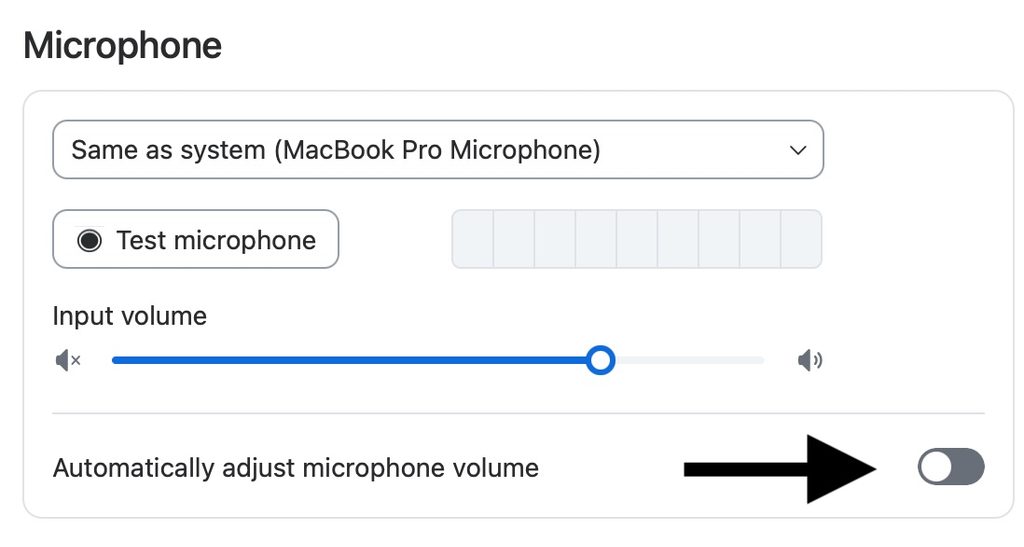
- Turn off “Automatically adjust microphone volume“
2. Enable “Original sound for musicians”
3. Activate “high fidelity music mode“
4. Disable echo cancellation
5. Activate “Stereo audio“

With all of this enabled, Zoom’s musician mode runs at around 192 kbps (“kilobytes per second” – the amount of data transferred a second). That’s not the highest quality audio possible – but it’s genuinely solid and totally sufficient for our use case. For comparison: Spotify’s free tier streams at 160 kbps, YouTube Music’s free tier at 128 kbps. Every day, people listen to music they enjoy at qualities at or below what Zoom’s musician mode gives you. So don’t let the number scare you – 192 kbps is a real, usable quality, not broken audio.
The best Zoom alternatives for virtual sound bath
YouTube (streamed via OBS or similar): Genuinely higher quality than Zoom, and video and audio arrive together in one link – no sign-in needed, nothing extra for your listener to do. The tradeoff: more setup, more settings to get right, more that can go wrong if you’re not used to a more technical streaming setup.
Instagram Live / TikTok Live: These work well as a way to share yourself and reach people – a marketing and visibility channel, not really a hosting channel. Instagram Live can only be restricted to your “Close Friends” list, which isn’t built for paid access, and that feature has reportedly been getting phased out. If you want to actually charge for a session, Instagram isn’t the platform to do it on.
Facebook Live / Twitch: Twitch works technically similar to YouTube. Twitch does have subscriber-only streams, but you need Affiliate or Partner status first, which requires 90 days of streaming history – a real barrier if you’re just starting out, not something you can turn on right away.
Dedicated live audio streaming (e.g. Listento): Worth mentioning as an option too – the quality can be even higher than a full video stream, but the tradeoff is that your video isn’t embedded together with it, so it’s a more fragmented experience for your listener. They might need to open several links to see your video as well as hear your sound.
The simplest alternative: pre-record and send it out. If you don’t need to be there live with people, this removes the whole Zoom problem entirely. Record at whatever quality you want, embed video if you like, upload it wherever fits your setup – and people can watch or listen whenever works for them, including listening back later.
Where you host it depends on your setup, not the platform
Once you’re not doing this live, the actual platform matters less than how it fits into your business:
- Sending to an email list → a direct cloud link (Google Drive, etc.) works fine
- Want it more protected → upload as an unlisted YouTube video, share only the direct link
- Running a paid offering → put it behind a real paywall/login on your own website/platform, so people can’t just forward the link to others
For file delivery specifically: use MP3, not a huge WAVE file. Host it on the cloud rather than emailing it directly (email attachments blow up in size fast). And make sure the link actually downloads the file instead of opening a preview page first – for Google Drive specifically, this means using a direct-download link format rather than the default share link, so people get the file with one click. (Source: How-To Geek, Google Drive direct download links)
Worth being honest about the tradeoff either way: a simple shared link can always be copied and passed along. If you’re running a real paid offering, a proper platform with a login is the only way to actually control access.
What I’d actually recommend
If you’re doing live sessions, always have a backup ready – something pre-recorded or an alternative audio streaming link you can fall back on if the tech fails on the day. If live feels too risky or stressful while you’re still building confidence with the tech, start with pre-recorded sessions instead. Less pressure, more time to get it right, and you can always add live sessions later once you’re comfortable.
Why I do this at all, and why the quality question matters less than you’d think
I host online sound healings because it gives people flexibility – they can tune into the relaxing power of my instruments whenever it actually works for them. A quick nap between work sessions, whenever, wherever they are.
They don’t need the highest possible quality. They need something that doesn’t distract them, that doesn’t make them think about the audio itself. Most people are listening on average headphones anyway – the bar isn’t “identical to being in the room,” it’s “distraction-free and genuinely good.” In my own experience, that’s absolutely achievable, and it can feel like a real session.
On the energetic side of things
Audio quality doesn’t determine whether an energetic connection happens. That connection is non-local – it’s not bound to time or physical proximity. What matters is that people can connect with your energy, with your intention, through the sound or through seeing you. That’s enough for the healing to work, especially if you’re working with intention-based or quantum healing rather than relying purely on physical vibration.
Stereo does matter here for a different reason – it’s what allows real psychoacoustic effects (like brainwave synchronization) to actually work through headphones. But a full-body physical vibration, the kind you feel standing next to a real gong? That’s never going to happen through headphones or home speakers, and that was never the goal. The goal is giving people something they can tune into, connect with your energy through, and genuinely relax into – whenever and wherever they need it.
Where to start
None of this has to be complicated. Pick the option that matches how much time and tech comfort you actually have right now – Zoom’s musician settings if you want the simplest path, pre-recording if you want zero live-session stress, or a proper streaming setup once you’re ready to go further. There’s no wrong starting point, just the one that fits where you are today.
If you’re not sure which setup actually makes sense for your specific instruments and situation, that’s exactly what I help people figure out. Book a call with me and we’ll sort out your setup together.